A (somewhat underwhelming) prototype pollution in Tampermonkey
If you’ve used a userscript manager before you’re probably familiar with the comment metatags that denote a script’s name, author, the websites it runs on, etc.
// ==UserScript==
// @name            Undiscord
// @description     Delete all messages in a Discord channel or DM (Bulk deletion)
// @version         5.2.6
// @author          victornpb
// @homepageURL     https://github.com/victornpb/undiscord
// @supportURL      https://github.com/victornpb/undiscord/discussions
// @match           https://*.discord.com/app
// @match           https://*.discord.com/channels/*
// @match           https://*.discord.com/login
// @license         MIT
// @namespace       https://github.com/victornpb/deleteDiscordMessages
// @icon            https://victornpb.github.io/undiscord/images/icon128.png
// @contributionURL https://www.buymeacoffee.com/vitim
// @grant           none
// @attribution     Original project (https://github.com/victornpb/undiscord)
// ==/UserScript==
Many of these tags are parsed before the script is even installed so they can be previewed on the install page. And since forcing users to the install page is as simple as redirecting to a .user.js gist, I figured there might be some surface for high impact bugs there.
Pollution
Most userscript managers support the internationalization of certain tags by appending a colon followed by the locale, e.g. @name:fr Nom du script.
Looking in Tampermonkey’s docs, I found a tag called @antifeature meant for disclosing monetization in scripts, also supporting i18n.
This is stored as a nested Object, where type and locale are used as parent and child keys. A textbook prototype pollution bug.
script.antifeatures[type][locale] = description// @antifeature:polluted __proto__ value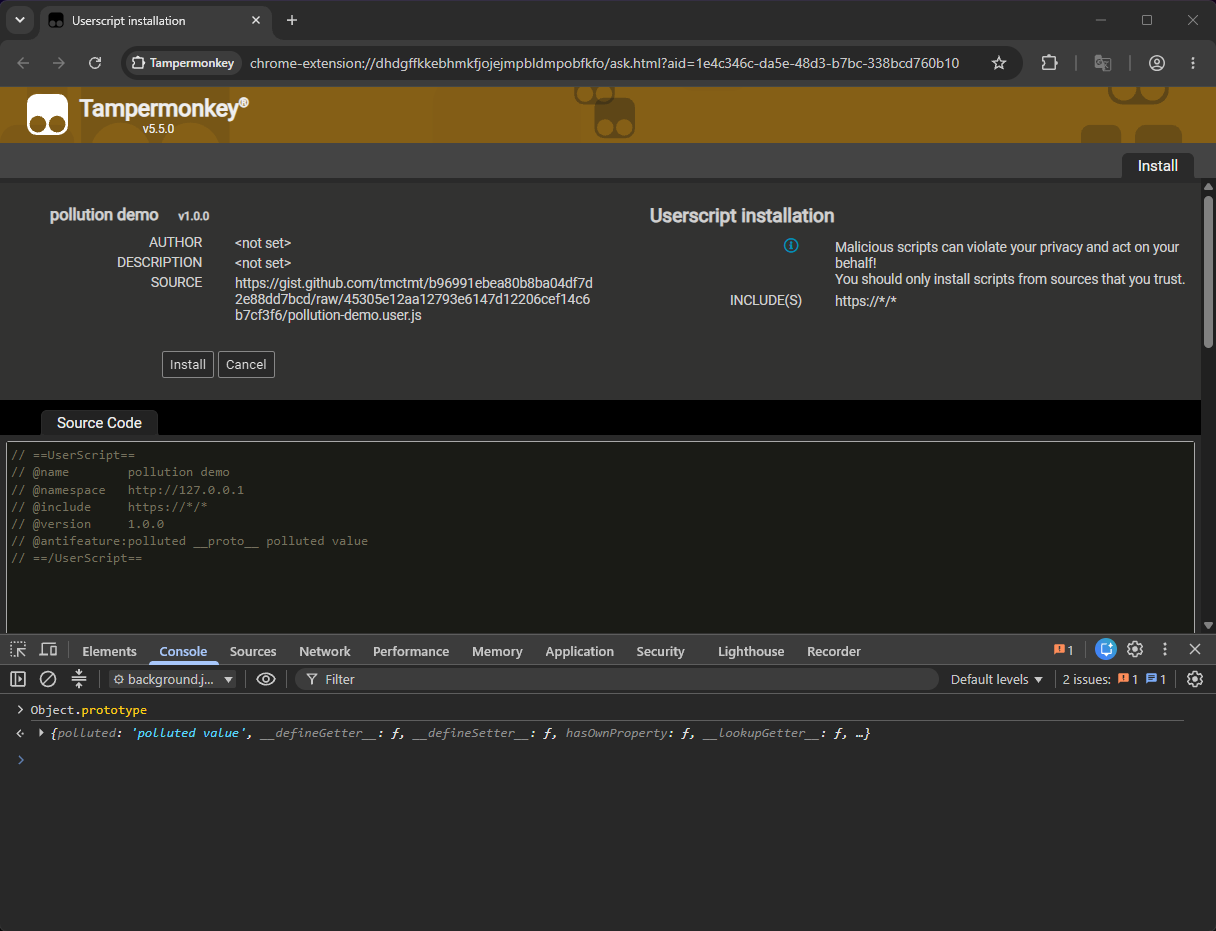
Limitations
A major setback to finding a gadget for this bug is the fact that locale is passed through a normalization function like so:
function Nr(e) {
    if (!e) return e;
    return e
        .replace(/-/g, "_")
        .split("_")
        .map(function (segment, index) {
            return index
                ? segment.toUpperCase()
                : segment.toLowerCase();
        })
        .join("_");
}
This takes any camelCase or snake_case variables out of the picture, leaving me with single words only and missing out on almost all config settings and much more :(
Dead ends
My goal in mind was finding a way to install scripts without user interaction, which essentially becomes UXSS when paired with a wildcard match pattern.
I thought I hit exactly that when I saw the key ask being used to differentiate between silent install operations like updates vs manual ones requiring user confirmation. But I quickly realized there was no way to shadow it from the prototype.
function installFromSource(e, t, n) {
    const r = y();
    t = t || {};
    const s = n || {},
        i = {
            src: e,
            ask: !0,
            replace: !0,
            ...t
        };
    return nl.doSave(i).done((e => {
        r.resolve(!!e.installed)
    })).fail((e => {
        e ? (e.heading = Qr.getMessage("You_are_about_to_install_a_UserScript_"), s.silent_fail ? r.reject(e) : Gi.installError(e).always((() => r.reject()))) : r.reject()
    })), r.promise()
}
Another gadget internal can be shadowed to hide some warnings on the install page but aside from that it achieves very little. The user still has to click the button.
e.internal || t.evilness != Uc.SEVERITY_FOISTED_SCRIPT || (n.warnings.push(Qr.getMessage("This_is_a_possibly_foisted_script_and_a_modification_will_enable_it_").blob
I eventually found something more useful. The blob gadget is able to override code for scripts during installs, edits, and automatic updates (kinda).
The first two scenarios are pretty user-involved. You redirect the victim to your pollution script (they don’t have to install it) and whatever else they install/edit afterwards is going to be overwritten with your code:
Hijacking updates is much cooler since it does not require user interaction, but it has a lot of conditions that make it far too impractical:
- Tampermonkey only checks for script updates on a 24 hour interval.
- An update is only initiated when the script pushes out a higher
@versionnumber. - And most annoyingly, MV3 will restart service workers after just 30s of inactivity, resetting the Object prototype in the process.
You’d have to pollute the victim in the window after one of their userscripts has released an update but before Tampermonkey has had a chance to see it. On top of that, they’d have to continue browsing nonstop until the script is updated.
For the vast majority of users the next update check is going to be several hours away, and it is quite unlikely that they’d continue browsing during that time without taking at least a single 30 second break between.
Still, there is a small portion of users whose next update check would be just a few minutes away, and in their case this should be doable, though I haven’t tested this.
Final words
Jan Biniok, the author of Tampermonkey, was remarkably responsive during the reporting process and had a patch ready within half a day of receiving my report, which is now available on all supported browsers.
Perhaps someone smarter could have chained this into something more impactful, but at the end of the day all I’m missing out on is a cooler post title :)